

SYNOPSIS
#include <agar/core.h>
#include <agar/gui.h>
DESCRIPTION
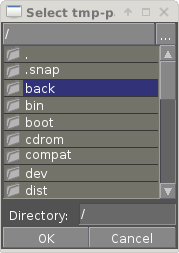 The
AG_DirDlg widget is a directory selection widget.
It provides an interface similar to
AG_FileDlg(3) but restricts selection to directories.
The
AG_DirDlg widget is a directory selection widget.
It provides an interface similar to
AG_FileDlg(3) but restricts selection to directories.
INHERITANCE HIERARCHY ↑
AG_Object(3)-> AG_Widget(3)-> AG_DirDlg.
INITIALIZATION ↑
AG_DirDlg* AG_DirDlgNew (AG_Widget *parent, Uint flags)
AG_DirDlg* AG_DirDlgNewMRU (AG_Widget *parent, const char *mruKey, Uint flags)
int AG_DirDlgSetDirectory (AG_DirDlg *dd, const char *format, ...)
int AG_DirDlgSetDirectoryS (AG_DirDlg *dd, const char *path)
void AG_DirDlgSetDirectoryMRU (AG_DirDlg *dd, const char *mruKey, const char *defaultDir)
The AG_DirDlgNew() function allocates, initializes, and attaches a new AG_DirDlg widget. The AG_DirDlgNewMRU() variant implicitely calls AG_DirDlgSetDirectoryMRU() with the given key. Note that unless AG_DirDlgSetDirectory() is used (see below), the default directory is set according to the AG_CONFIG_PATH_DATA setting of AG_Config(3).
Acceptable flags include:
| AG_DIRDLG_MULTI | Allow multiple directories to be selected at once. |
| AG_DIRDLG_CLOSEWIN | Automatically close the AG_DirDlg widget's parent window when a directory is selected. |
| AG_DIRDLG_LOAD | The selected directory must exist and be accessible or an error is returned to the user. |
| AG_DIRDLG_SAVE | The selected directory must be writeable or an error is returned to the user. |
| AG_DIRDLG_NOBUTTONS | Don't display "OK" and "Cancel" buttons. |
| AG_DIRDLG_HFILL | Expand horizontally in parent container. |
| AG_DIRDLG_VFILL | Expand vertically in parent container. |
| AG_DIRDLG_EXPAND | Shorthand for AG_DIRDLG_HFILL AG_DIRDLG_VFILL|. |
The active directory can be set programmatically with the AG_DirDlgSetDirectory() function.
The AG_DirDlgSetDirectoryMRU() sets the working directory according to an AG_Config(3) parameter named mruKey If the parameter does not exist, it will be set to defaultDir (it is customary to use a name such as myapp.mru.foodir). If AG_DirDlgSetDirectoryMRU() is used, subsequent directory changes will cause the current AG_Config(3) settings to be saved automatically.
OK/CANCEL ACTIONS ↑
By default, selecting a directory will trigger the following checks:
The default action performed when a user clicks on "Cancel" is simply to close the parent window if AG_DIRDLG_CLOSEWIN is set.
These default actions can be overridden using the functions below:
void AG_DirDlgOkAction (AG_DirDlg *dd, void (*fn)(AG_Event *), const char *fmt, ...)
void AG_DirDlgCancelAction (AG_DirDlg *dd, void (*fn)(AG_Event *), const char *fmt, ...)
int AG_DirDlgCheckReadAccess (AG_DirDlg *dd)
int AG_DirDlgCheckWriteAccess (AG_DirDlg *dd)
The AG_DirDlgOkAction() function configures an event handler function to invoke when a directory is selected, overriding the default behavior. The event handler will be passed a string argument containing the absolute path to the selected directory.
AG_DirDlgCancelAction() overrides the default behavior of the "Cancel" button.
The utility functions AG_DirDlgCheckReadAccess() and AG_DirDlgCheckWriteAccess() evaluate whether the selected directory is readable or writeable.
- If AG_DIRDLG_LOAD or AG_DIRDLG_SAVE is set, check whether the directory is accessible or writeable.
- Select the directory, raising a dir-chosen event.
- If AG_DIRDLG_CLOSEWIN is set, close the parent window.
The default action performed when a user clicks on "Cancel" is simply to close the parent window if AG_DIRDLG_CLOSEWIN is set.
These default actions can be overridden using the functions below:
void AG_DirDlgOkAction (AG_DirDlg *dd, void (*fn)(AG_Event *), const char *fmt, ...)
void AG_DirDlgCancelAction (AG_DirDlg *dd, void (*fn)(AG_Event *), const char *fmt, ...)
int AG_DirDlgCheckReadAccess (AG_DirDlg *dd)
int AG_DirDlgCheckWriteAccess (AG_DirDlg *dd)
The AG_DirDlgOkAction() function configures an event handler function to invoke when a directory is selected, overriding the default behavior. The event handler will be passed a string argument containing the absolute path to the selected directory.
AG_DirDlgCancelAction() overrides the default behavior of the "Cancel" button.
The utility functions AG_DirDlgCheckReadAccess() and AG_DirDlgCheckWriteAccess() evaluate whether the selected directory is readable or writeable.
BINDINGS ↑
The
AG_DirDlg widget does not provide any bindings.
EVENTS ↑
The
AG_DirDlg widget generates the following events:
| dir-chosen (char *path) | The user has selected the given directory. path is the full pathname to the directory. |
| dir-selected (char *path) | The user has browsed to the given directory. |
STRUCTURE DATA ↑
For the
AG_DirDlg object:
| char cwd[AG_PATHNAME_MAX] | Absolute path of current working directory. |
EXAMPLES ↑
See
tests/loader.c in the Agar source distribution.
SEE ALSO ↑
HISTORY ↑
The
AG_DirDlg widget first appeared in
Agar 1.4.1.