

SYNOPSIS
#include <agar/core.h>
#include <agar/gui.h>
DESCRIPTION
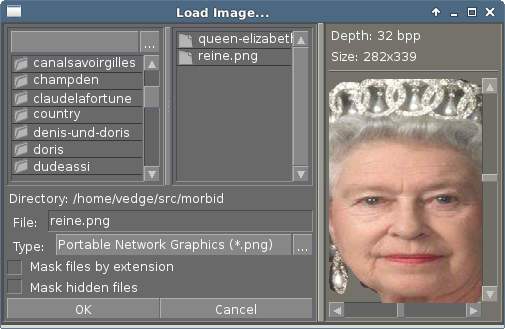 AG_FileDlg is a traditional file selection widget.
It displays a list of directories and shortcuts at the left, a list of files
at the right and an input textbox and file type selector at the bottom.
If supports filesystem monitoring via
AG_AddEventSink(3). On platforms with
glob(3) support, glob patterns may be entered in the input textbox.
AG_FileDlg is a traditional file selection widget.
It displays a list of directories and shortcuts at the left, a list of files
at the right and an input textbox and file type selector at the bottom.
If supports filesystem monitoring via
AG_AddEventSink(3). On platforms with
glob(3) support, glob patterns may be entered in the input textbox.
Although AG_FileDlg is most often used to implement "Load" or "Save as..." dialog windows, it may also be embedded into any arbitrary container widget. User-specified actions (with optional parameters) can be tied to specific file extensions.
For selecting directories, the AG_DirDlg(3) widget may be used instead.
INHERITANCE HIERARCHY ↑
AG_Object(3)-> AG_Widget(3)-> AG_FileDlg.
INTERFACE ↑
AG_FileDlg * AG_FileDlgNew (AG_Widget *parent, Uint flags)
AG_FileDlg * AG_FileDlgNewMRU (AG_Widget *parent, const char *mruKey, Uint flags)
AG_FileDlg * AG_FileDlgNewCompact (AG_Widget *parent, const char *label, Uint flags)
AG_FileDlg * AG_FileDlgNewCompactMRU (AG_Widget *parent, const char *label, const char *mruKey, Uint flags)
char * AG_FileDlgGetDirectory (AG_FileDlg *fd)
AG_Size AG_FileDlgCopyDirectory (AG_FileDlg *fd, char *dst, AG_Size size)
int AG_FileDlgSetDirectory (AG_FileDlg *fd, const char *format, ...)
int AG_FileDlgSetDirectoryS (AG_FileDlg *fd, const char *path)
void AG_FileDlgSetDirectoryMRU (AG_FileDlg *fd, const char *mruKey, const char *defaultDir)
char * AG_FileDlgGetFilename (AG_FileDlg *fd)
AG_Size AG_FileDlgCopyFilename (AG_FileDlg *fd, char *dst, AG_Size size)
void AG_FileDlgSetFilename (AG_FileDlg *fd, const char *format, ...)
void AG_FileDlgSetFilenameS (AG_FileDlg *fd, const char *filename)
AG_FileType * AG_FileDlgAddType (AG_FileDlg *fd, const char *descr, const char *exts, void (*fn)(AG_Event *), const char *fnArgs, ...)
void AG_FileDlgAddImageTypes (AG_FileDlg *fd, void (*fn)(AG_Event *), const char *fnArgs, ...)
void AG_FileDlgCopyTypes (AG_FileDlg *dst, const AG_FileDlg *src)
void AG_FileDlgRefresh (AG_FileDlg *fd)
AG_FileDlgNew() allocates, initializes, and attaches a new AG_FileDlg.
The AG_FileDlgNewMRU() variant calls AG_FileDlgSetDirectoryMRU() with mruKey. Unless AG_FileDlgSetDirectory() is used (see below), the default directory is set according to the AG_CONFIG_PATH_DATA setting of AG_Config(3).
AG_FileDlgNewCompact() and AG_FileDlgNewCompactMRU() implicitely set the AG_FILEDLG_COMPACT flag as well as the contents of the display label.
Acceptable flags include:
| AG_FILEDLG_COMPACT | Proxy mode. Collapse to a single-line textbox and "..." button. The expand button shows a regular AG_FileDlg in a new window. If the user selects a file and clicks "OK", the file path is copied to the textbox of the compact AG_FileDlg. |
| AG_FILEDLG_MASK_EXT | Mask unknown files by extension. |
| AG_FILEDLG_MASK_HIDDEN | Mask hidden files. |
| AG_FILEDLG_MULTI | Allow multiple files to be selected at once. |
| AG_FILEDLG_CLOSEWIN | Automatically close the AG_FileDlg widget's parent window when a file is selected. |
| AG_FILEDLG_LOAD | The selected file must exist and be readable or an error is returned to the user. |
| AG_FILEDLG_SAVE | The selected file must be writeable or an error is returned to the user. |
| AG_FILEDLG_ASYNC | Load/save routines will be executed in a separate thread. This flag is available only if agar was compiled with threads support. |
| AG_FILEDLG_NOMASKOPTS | Don't display "Mask files by extension" and "Mask hidden files" checkboxes. |
| AG_FILEDLG_NOTYPESELECT | Don't display the "Type:" selector dropbox. |
| AG_FILEDLG_NOBUTTONS | Don't display "OK" and "Cancel" buttons. |
| AG_FILEDLG_HFILL | Expand horizontally in parent container. |
| AG_FILEDLG_VFILL | Expand vertically in parent container. |
| AG_FILEDLG_EXPAND | Shorthand for AG_FILEDLG_HFILL AG_FILEDLG_VFILL|. |
The working directory can be retrieved as a newly-allocated string using AG_FileDlgGetDirectory(), or copied into a fixed-size buffer with AG_FileDlgCopyDirectory(). AG_FileDlgSetDirectory().
AG_FileDlgSetDirectoryMRU() sets the working directory according to an AG_Config(3) parameter named mruKey. If the parameter does not exist, it will be set to defaultDir (it is customary to use a name such as myapp.mru.foofiles). If AG_FileDlgSetDirectoryMRU() is used, subsequent directory changes will cause the current AG_Config(3) settings to be saved automatically.
The current filename can be retrieved as a newly-allocated string using AG_FileDlgGetFilename(), or copied into a fixed-size buffer with AG_FileDlgCopyFilename().
The AG_FileDlgSetFilename() function sets the filename to initially display in the textbox. It is typically used in file saving dialogs.
AG_FileDlgAddType() registers a new type-specific event handler for a given file format (and associated set of filename extensions). If fn is non-NULL, it sets a type-specific callback to invoke when a file of the selected type is selected by the user. descr is a description of the file format and exts is a comma-separated list of filename extensions or special directives (enclosed in "<>"). Syntax for extensions include:
| ".txt" or "*.txt" | Match all files ending in ".txt". |
| "<-x>" | Match all files that are executable by the effective owner of the process (using AG_GetFileInfo(3)). |
| "<=hello.txt>" | Only match hello.txt (case-sensitive exact match). |
| "<=hello.txt/i>" | Match hello.txt, Hello.txt, etc (case-insensitive). |
Type-specific handlers do not override the general "file-chosen" event handler when one exists (if both are set then the type-specific handler is run first, followed by "file-chosen").
AG_FileDlgAddImageTypes() registers a common handler for all image types recognized by AG_SurfaceFromFile(3) (such as BMP, PNG and JPEG).
AG_FileDlgCopyTypes() copies the set of AG_FileType (and any associated type-specific options), from one AG_FileDlg to another.
The AG_FileDlgRefresh() function updates the displayed directory structure and current directory contents.
OK/CANCEL ACTIONS ↑
By default, selecting a file will trigger the following checks:
The default action performed when a user clicks on "Cancel" is simply to close the parent window if AG_FILEDLG_CLOSEWIN is set.
These default actions can be overridden using the functions below:
void AG_FileDlgOkAction (AG_FileDlg *fd, void (*fn)(AG_Event *), const char *fmt, ...)
void AG_FileDlgCancelAction (AG_FileDlg *fd, void (*fn)(AG_Event *), const char *fmt, ...)
int AG_FileDlgCheckReadAccess (AG_FileDlg *fd)
int AG_FileDlgCheckWriteAccess (AG_FileDlg *fd)
The AG_FileDlgOkAction() function configures an event handler function to invoke when a file is selected, overriding the default behavior. The event handler will be passed a string argument containing the absolute path to the selected file, followed by a pointer to the AG_FileType structure for the file type selected by the user (see STRUCTURE DATA for details).
AG_FileDlgCancelAction() overrides the default behavior of the "Cancel" button.
AG_FileDlgCheckReadAccess() and AG_FileDlgCheckWriteAccess() evaluate whether the selected file is readable or writeable.
- If AG_FILEDLG_LOAD or AG_FILEDLG_SAVE is set, check whether the file is readable or writeable.
- If AG_FILEDLG_SAVE is set and a file exists, display a "Replace file?" prompt.
- Execute the format-specific callback, as previously configured with AG_FileDlgAddType().
- If AG_FILEDLG_CLOSEWIN is set, close the parent window.
The default action performed when a user clicks on "Cancel" is simply to close the parent window if AG_FILEDLG_CLOSEWIN is set.
These default actions can be overridden using the functions below:
void AG_FileDlgOkAction (AG_FileDlg *fd, void (*fn)(AG_Event *), const char *fmt, ...)
void AG_FileDlgCancelAction (AG_FileDlg *fd, void (*fn)(AG_Event *), const char *fmt, ...)
int AG_FileDlgCheckReadAccess (AG_FileDlg *fd)
int AG_FileDlgCheckWriteAccess (AG_FileDlg *fd)
The AG_FileDlgOkAction() function configures an event handler function to invoke when a file is selected, overriding the default behavior. The event handler will be passed a string argument containing the absolute path to the selected file, followed by a pointer to the AG_FileType structure for the file type selected by the user (see STRUCTURE DATA for details).
AG_FileDlgCancelAction() overrides the default behavior of the "Cancel" button.
AG_FileDlgCheckReadAccess() and AG_FileDlgCheckWriteAccess() evaluate whether the selected file is readable or writeable.
FORMAT-SPECIFIC OPTIONS ↑
When we are using
AG_FileDlg to load and save files, we may want to provide the user with format-specific
options that will affect the loading or saving process.
Format-specific options are associated with a file type (an
AG_FileType as returned by
AG_FileDlgAddType()). When a file type is selected,
AG_FileDlg displays basic widgets enabling the user to manipulate those options.
void AG_FileDlgSetOptionContainer (AG_FileDlg *fd, AG_Widget *container)
AG_FileOption * AG_FileOptionNewBool (AG_FileType *type, const char *descr, const char *key, int default)
AG_FileOption * AG_FileOptionNewInt (AG_FileType *type, const char *descr, const char *key, int default, int min, int max)
AG_FileOption * AG_FileOptionNewFlt (AG_FileType *type, const char *descr, const char *key, float default, float min, float max, const char *unit)
AG_FileOption * AG_FileOptionNewDbl (AG_FileType *type, const char *descr, const char *key, double default, double min, double max, const char *unit)
AG_FileOption * AG_FileOptionGet (AG_FileType *type, const char *key)
int AG_FileOptionBool (AG_FileType *type, const char *key)
int AG_FileOptionInt (AG_FileType *type, const char *key)
float AG_FileOptionFlt (AG_FileType *type, const char *key)
double AG_FileOptionDbl (AG_FileType *type, const char *key)
AG_FileDlgSetOptionContainer() arranges for the given container widget to hold the control widgets that will be dynamically created.
AG_FileOptionNewBool() registers a boolean option, manipulated by an AG_Checkbox(3). descr is a description string and key is a handle that the save/load routine will use to retrieve the option. default indicates the initial value of the option (1 = true, 0 = false).
AG_FileOptionNewInt() registers an integer option, manipulated by an AG_Numerical(3). default is the initial value, min and max define the bounds.
AG_FileOptionNewFlt() and AG_FileOptionNewDbl() register single and double precision floating-point options, using AG_Numerical(3). default is the initial value, min and max define the bounds and unit, if not NULL, is the unit system to use (see AG_Units(3)).
AG_FileOptionGet() returns a pointer to the AG_FileOption structure for the given option name, or NULL if there is no such option. AG_FileOptionBool(), AG_FileOptionInt(), AG_FileOptionFlt() and AG_FileOptionDbl() return the value of the given option.
void AG_FileDlgSetOptionContainer (AG_FileDlg *fd, AG_Widget *container)
AG_FileOption * AG_FileOptionNewBool (AG_FileType *type, const char *descr, const char *key, int default)
AG_FileOption * AG_FileOptionNewInt (AG_FileType *type, const char *descr, const char *key, int default, int min, int max)
AG_FileOption * AG_FileOptionNewFlt (AG_FileType *type, const char *descr, const char *key, float default, float min, float max, const char *unit)
AG_FileOption * AG_FileOptionNewDbl (AG_FileType *type, const char *descr, const char *key, double default, double min, double max, const char *unit)
AG_FileOption * AG_FileOptionGet (AG_FileType *type, const char *key)
int AG_FileOptionBool (AG_FileType *type, const char *key)
int AG_FileOptionInt (AG_FileType *type, const char *key)
float AG_FileOptionFlt (AG_FileType *type, const char *key)
double AG_FileOptionDbl (AG_FileType *type, const char *key)
AG_FileDlgSetOptionContainer() arranges for the given container widget to hold the control widgets that will be dynamically created.
AG_FileOptionNewBool() registers a boolean option, manipulated by an AG_Checkbox(3). descr is a description string and key is a handle that the save/load routine will use to retrieve the option. default indicates the initial value of the option (1 = true, 0 = false).
AG_FileOptionNewInt() registers an integer option, manipulated by an AG_Numerical(3). default is the initial value, min and max define the bounds.
AG_FileOptionNewFlt() and AG_FileOptionNewDbl() register single and double precision floating-point options, using AG_Numerical(3). default is the initial value, min and max define the bounds and unit, if not NULL, is the unit system to use (see AG_Units(3)).
AG_FileOptionGet() returns a pointer to the AG_FileOption structure for the given option name, or NULL if there is no such option. AG_FileOptionBool(), AG_FileOptionInt(), AG_FileOptionFlt() and AG_FileOptionDbl() return the value of the given option.
BINDINGS ↑
The
AG_FileDlg widget does not provide any bindings.
EVENTS ↑
The
AG_FileDlg widget generates the following events:
| file-chosen (char *path, AG_FileType *type) | User has selected the given file. path is the full pathname to the file. If not NULL, type describes the matching type of the file. |
| file-selected (char *path) | User has moved selection over the given file, where path is the full pathname to it. This event is useful for things like previewing file contents using an external widget. |
| dir-selected (char *path) | The given directory was selected. |
STRUCTURE DATA ↑
For the
AG_FileDlg object:
For the AG_FileType structure (as returned by AG_FileDlgAddType()):
| char cwd[AG_PATHNAME_MAX] | Absolute path of current working directory. |
| char cfile[AG_PATHNAME_MAX] | Absolute path of last selected file. |
For the AG_FileType structure (as returned by AG_FileDlgAddType()):
| AG_FileDlg *fd | Back pointer to the parent AG_FileDlg (read-only). |
| char **exts | List of associated file extensions. |
| Uint nExts | Count of file extensions. |
| const char *descr | Description string (read-only). |
| AG_Event *action | Callback function (as returned by AG_SetEvent(3)) to invoke when a file of this type is selected for a load/save operation. |
EXAMPLES ↑
See
tests/loader.c in the Agar source distribution.
SEE ALSO ↑
HISTORY ↑
The
AG_FileDlg widget first appeared in
Agar 1.0.
The
AG_FILEDLG_COMPACT option as well as
AG_FileDlgNewCompact(), AG_FileDlgNewCompactMRU(), AG_FileDlgGetDirectory(), AG_FileDlgCopyDirectory(), AG_FileDlgGetFilename(), AG_FileDlgCopyFilename(), AG_FileDlgCopyTypes() and
AG_FileDlgAddImageTypes() routines appeared in
Agar 1.6.0.