

SYNOPSIS
#include <agar/core.h>
#include <agar/gui.h>
DESCRIPTION
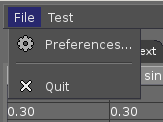 The
AG_Menu widget displays a hierarchical menu composed of items of the following types:
The
AG_Menu widget displays a hierarchical menu composed of items of the following types:
| Action items | Selecting the item causes a specified function to be invoked, with the specified arguments. See AG_MenuAction(). |
| Boolean items | A menu item tied to a variable describing a boolean value (either an integer, or specific bits in an integer). Selecting an active boolean item will toggle the value. See AG_MenuBool(). |
| Separators | A cosmetic separator, displayed as a horizontal or vertical bar depending on the display mode. See AG_MenuSeparator(). |
| Dynamic items | A dynamically updated menu item. The item itself (possibly including child items) are expected to be generated by a specified callback routine. The first argument to the callback routine is a pointer to the AG_MenuItem. An example of a dynamic item would be a submenu displaying the current contents of a folder. See AG_MenuDynamicItem(). |
Menu elements can be displayed in text format with the AG_MenuView widget, or in icon format using AG_Toolbar(3).
Note: Many functions of AG_Menu accept fn and fnArgs arguments; see AG_Event(3) for details on event handler functions in Agar.
INHERITANCE HIERARCHY ↑
AG_Object(3)-> AG_Widget(3)-> AG_Menu.
INITIALIZATION ↑
AG_Menu * AG_MenuNew (AG_Widget *parent, Uint flags)
AG_Menu * AG_MenuNewGlobal (Uint flags)
void AG_MenuExpand (AG_Widget *parentWidget, AG_MenuItem *item, int x, int y)
void AG_MenuCollapse (AG_MenuItem *item)
void AG_MenuCollapseAll (AG_Menu *m)
void AG_MenuSetPadding (AG_Menu *menu, int left, int right, int top, int bottom)
void AG_MenuSetLabelPadding (AG_Menu *menu, int left, int right, int top, int bottom)
The AG_MenuNew() function allocates, initializes, and attaches a new AG_Menu widget. See the FLAGS sections for available flags options.
The AG_MenuNewGlobal() constructor creates a global "application menu". The manner in which application menus are displayed is dependent on the underlying platform and graphics system. If there is insufficient memory, or an application menu is already defined, AG_MenuNewGlobal() may fail returning NULL.
The AG_MenuExpand() function creates a new window containing an AG_MenuView widget displaying the menu items under item. The optional parentWidget argument should point to some parent widget or window. The new window is created at coordinates x, y relative to parentWidget. The newly created window is also attached to the parent window of parentWidget.
AG_MenuCollapse() closes the window previously created by AG_MenuExpand() for the given menu item. AG_MenuCollapseAll() closes all windows generated by AG_MenuExpand() for the whole menu m.
AG_MenuSetPadding() sets the global padding around all menu items, in pixels. AG_MenuSetLabelPadding() sets the padding around the text label of items. If a parameter is -1, its current value is preserved.
MENU ITEMS ↑
AG_MenuItem * AG_MenuNode (AG_MenuItem *parent, const char *text, const AG_Surface *icon)
AG_MenuItem * AG_MenuAction (AG_MenuItem *parent, const char *text, const AG_Surface *icon, void (*fn)(AG_Event *), const char *fnArgs, ...)
AG_MenuItem * AG_MenuActionKb (AG_MenuItem *parent, const char *text, const AG_Surface *icon, AG_KeySym keysym, AG_KeyMod keymod, void (*fn)(AG_Event *), const char *fnArgs, ...)
AG_MenuItem * AG_MenuDynamicItem (AG_MenuItem *parent, const char *text, const AG_Surface *icon, void (*fn)(AG_Event *), const char *fnArgs, ...)
AG_MenuItem * AG_MenuDynamicItemKb (AG_MenuItem *parent, const char *text, const AG_Surface *icon, AG_KeySym key, AG_KeyMod kmod, void (*fn)(AG_Event *), const char *fnArgs, ...)
AG_MenuItem * AG_MenuTool (AG_MenuItem *parent, AG_Toolbar *toolbar, const char *text, const AG_Surface *icon, AG_KeySym keysym, AG_KeyMod keymod, void (*fn)(AG_Event *), const char *fnArgs, ...)
void AG_MenuSetIcon (AG_MenuItem *item, const AG_Surface *su)
void AG_MenuSetLabel (AG_MenuItem *item, const char *format, ...)
void AG_MenuSetLabelS (AG_MenuItem *item, const char *label)
void AG_MenuSetPollFn (AG_MenuItem *item, void (*fn)(AG_Event *), const char *fnArgs, ...)
void AG_MenuDel (AG_MenuItem *menu)
void AG_MenuState (AG_MenuItem *item, int state)
void AG_MenuEnable (AG_MenuItem *item)
void AG_MenuDisable (AG_MenuItem *item)
The AG_MenuNode() function inserts a new node (no-op) item displaying the given text and icon (or NULL if none). Node items are typically only used to attach subitems.
The AG_MenuAction() function inserts a new action item displaying the given text and icon (or NULL if none). When selected, the item will invoke the specified event handler function fn.
The AG_MenuActionKb() variant also associates the action with the given AG_KeySym(3) and modifier.
The AG_MenuTool() variant also inserts an item into the specified AG_Toolbar(3) widget.
The AG_MenuSetIcon() function sets the icon associated with a menu item. If an argument of NULL is given, any existing icon is removed.
AG_MenuSetLabel() changes the text associated with an existing menu item. AG_MenuSetPollFn() changes the callback function associated with a given item (previously created with AG_MenuDynamicItem()).
The AG_MenuDynamicItem() function creates a dynamic menu item. The specified callback routine fn will be invoked repeatedly to update the menu item, with the AG_Menu as receiver object (access with AG_MENU_SELF()), and the first Pointer argument a pointer to the AG_MenuItem. The callback routine is allowed to directly modify the state member of the AG_MenuItem. This variable defines the boolean state for the specified menu item (0 = disabled, 1 = enabled). If state is -1, the boolean state is determined from any boolean/flag binding associated with the item. The callback can also change the text label and icon using AG_MenuSetLabel() and AG_MenuSetIcon().
The AG_MenuDel() routine deletes the specified menu item and its sub-items.
The AG_MenuState() (or its variants AG_MenuEnable() and AG_MenuDisable()) request that all subsequently created menu items are assigned the given state.
BOOLEAN AND BITMASK ITEMS ↑
AG_MenuItem * AG_MenuBool (AG_MenuItem *, const char *text, const AG_Surface *icon, int *value, int invert)
AG_MenuItem * AG_MenuBoolMp (AG_MenuItem *, const char *text, const AG_Surface *icon, int *value, int invert, AG_Mutex *mutex)
AG_MenuItem * AG_MenuIntBool (AG_MenuItem *, const char *text, const AG_Surface *icon, int *value, int invert)
AG_MenuItem * AG_MenuIntBoolMp (AG_MenuItem *, const char *text, const AG_Surface *icon, int *value, int invert, AG_Mutex *mutex)
AG_MenuItem * AG_MenuInt8Bool (AG_MenuItem *, const char *text, const AG_Surface *icon, Uint8 *value, int invert)
AG_MenuItem * AG_MenuInt8BoolMp (AG_MenuItem *, const char *text, const AG_Surface *icon, Uint8 *value, int invert, AG_Mutex *mutex)
AG_MenuItem * AG_MenuFlags (AG_MenuItem *, const char *text, const AG_Surface *icon, int *value, int flags, int invert)
AG_MenuItem * AG_MenuFlagsMp (AG_MenuItem *, const char *text, const AG_Surface *icon, int *value, int flags, int invert, AG_Mutex *mutex)
AG_MenuItem * AG_MenuIntFlags (AG_MenuItem *, const char *text, const AG_Surface *icon, int *value, int flags, int invert)
AG_MenuItem * AG_MenuIntFlagsMp (AG_MenuItem *, const char *text, const AG_Surface *icon, int *value, int flags, int invert, AG_Mutex *mutex)
AG_MenuItem * AG_MenuInt8Flags (AG_MenuItem *, const char *text, const AG_Surface *icon, Uint8 *value, Uint8 flags, int invert)
AG_MenuItem * AG_MenuInt8FlagsMp (AG_MenuItem *, const char *text, const AG_Surface *icon, Uint8 *value, Uint8 flags, int invert, AG_Mutex *mutex)
AG_MenuItem * AG_MenuInt16Flags (AG_MenuItem *, const char *text, const AG_Surface *icon, Uint16 *value, Uint16 flags, int invert)
AG_MenuItem * AG_MenuInt16FlagsMp (AG_MenuItem *, const char *text, const AG_Surface *icon, Uint16 *value, Uint16 flags, int invert, AG_Mutex *mutex)
AG_MenuItem * AG_MenuInt32Flags (AG_MenuItem *, const char *text, const AG_Surface *icon, Uint32 *value, Uint32 flags, int invert)
The AG_Menu*Bool() functions create a new item that binds to the given boolean variable. If the invert parameter is non-zero, the actual value is inverted.
The AG_Menu*Flags() functions create a new item controlling one or more bits inside an integer value. The flags argument specifies the bitmask. If invert is non-zero, the bits are inverted.
The AG_Menu*BoolMp() and AG_Menu*FlagsMp() variants accept a AG_Mutex * argument specifying a mutex to acquire prior to reading or writing the data.
OTHER ITEMS ↑
void AG_MenuSeparator (AG_MenuItem *item)
void AG_MenuSection (AG_MenuItem *item, const char *format, ...)
void AG_MenuSectionS (AG_MenuItem *item, const char *text)
The AG_MenuSeparator() function inserts a horizontal menu separator.
AG_MenuSection() creates a non-selectable item displaying the given text.
POPUP MENUS ↑
AG_PopupMenu * AG_PopupNew (AG_Widget *widget)
void AG_PopupShow (AG_PopupMenu *pm)
void AG_PopupShowAt (AG_PopupMenu *pm, int x, int y)
void AG_PopupHide (AG_PopupMenu *pm)
void AG_PopupDestroy (AG_Widget *widget, AG_PopupMenu *pm)
The AG_PopupNew() function creates a new popup menu and associates it with the specified widget. This association will cause the popup menu to be automatically freed when the given widget is destroyed.
Once a popup menu is created, new items can be inserted using the root member of the AG_PopupMenu structure as parent.
AG_PopupShow() displays the popup menu at the current mouse coordinates. AG_PopupShowAt() accepts global (view) coordinates. AG_PopupHide() hides the popup menu from the user.
AG_PopupDestroy() detaches the specified popup menu from its associated widget, and releases its allocated resources. This function is automatically invoked whenever a widget is destroyed.
EVENTS ↑
The
AG_Menu widget does not generate any event.
BINDINGS ↑
The
AG_Menu widget does not provide any binding.
STRUCTURE DATA ↑
For the
AG_Menu object:
For the AG_MenuItem structure:
| AG_MenuItem *root | The root menu item (read-only). |
| AG_MenuItem *itemSel | The currently selected top-level item (read-only). Top-level items are attached directly to root. |
| int selecting | Selection is in progress if set to 1 (read-only). |
For the AG_MenuItem structure:
| char *text | Displayed text for the menu item (read-only, set by AG_MenuSetLabel()). |
| AG_Surface *icon | The AG_Surface(3) of the menu icon, or NULL (read-only, set by AG_MenuSetIcon()). |
| int value | The boolean state of the item, used by default. If the boolean state was bound to another variable (e.g., using AG_MenuBool()) then this value will be ignored. |
| int state | Make item clickable (1) or disabled (0). |
| int (*stateFn)(AG_Event *) | Evaluate function to determine if item is active. Overrides the state flag. |
| AG_Menu *pmenu | Back pointer to the parent AG_Menu (read-only). |
FLAGS ↑
The
flags member of the
AG_Menu structure accepts the following flags:
| AG_MENU_HFILL | Fill any remaining horizontal space (hint to vertically-packing containers). |
| AG_MENU_VFILL | Fill any remaining vertical space (hint to horizontal-packing containers). |
| AG_MENU_EXPAND | Shorthand for AG_MENU_HFILL AG_MENU_VFILL|. |
| AG_MENU_NO_COLOR_BG | By default, the "background-color" of menu expansion windows is inherited from the "color" attribute associated with the AG_MenuView class (see AG_Style(3)). This flag disables that behavior, which can be useful for some applications (for example, if alternate colors are to be assigned to specific menu expansions). |
| AG_MENU_NO_BOOL_MSG | By default, a notification message is displayed in order to provide visual feedback when the user toggles a Menu-bound boolean value with a keyboard shortcut (and the menu is currently hidden). This flag disables that behavior. |
| AG_MENU_FAST_BOOL_MSG | By default, the notification message displayed when the user toggles a boolean is displayed for 1s. This flag causes the message to be displayed for 250ms instead. |
EXAMPLES ↑
The following code fragment creates a popup menu with a disabled item:
The following code fragment creates a popup menu with a dynamically determined "disabled" state:
The following code fragment associates a menu with an AG_Toolbar(3). Buttons and menu entries are created for the same actions.
The following code fragment creates a menu with an action item, a boolean item and two bitmask items.
AG_PopupMenu *pm;
AG_MenuItem *mi;

pm = AG_PopupNew(myParentWidget);

AG_MenuAction(pm->root, "Copy", NULL, DoCopy, NULL);

mi = AG_MenuAction(pm->root, "Paste", NULL, DoPaste, NULL);
mi->state = (myClipboard->contents > 0);
The following code fragment creates a popup menu with a dynamically determined "disabled" state:
static int
PasteActive(AG_Event *event)
{
	Clipboard *C = AG_PTR(1);
	return (C->contents > 0);
}

AG_PopupMenu *pm;
AG_MenuItem *mi;

pm = AG_PopupNew(myParentWidget);

AG_MenuAction(pm->root, "Copy", NULL, DoCopy, NULL);

mi = AG_MenuAction(pm->root, "Paste", NULL, DoPaste, NULL);

mi->stateFn = AG_SetIntFn(pm->menu, NULL,
    PasteActive, "%p", myClipboard);
The following code fragment associates a menu with an AG_Toolbar(3). Buttons and menu entries are created for the same actions.
AG_Toolbar *toolbar;
AG_Menu *menu;
AG_MenuItem *item;

toolbar = AG_ToolbarNew(win, AG_TOOLBAR_HORIZ, 1, 0);
menu = AG_MenuNew(win, 0);
item = AG_MenuNode(menu->root, "File", NULL);
{
	AG_MenuToolbar(item, toolbar);
	AG_MenuAction(item, "Load", NULL, LoadFile, NULL);
	AG_MenuAction(item, "Save", NULL, SaveFile, NULL);
	AG_MenuToolbar(item, NULL);
}
The following code fragment creates a menu with an action item, a boolean item and two bitmask items.
Uint16 flags = 0;
#define FOO_FLAG 0x01
#define BAR_FLAG 0x02

void
SayHello(AG_Event *event)
{
	char *s = AG_STRING(1);

	AG_TextMsg(AG_MSG_INFO, "Hello, %s!", s);
}

void
QuitApplication(AG_Event *event)
{
	AG_Quit();
}

...

AG_Menu *menu = AG_MenuNew(win);
AG_MenuItem *item = AG_MenuNode(menu->root, "File", NULL);
{
	AG_MenuInt16Flags(item, "Foo", NULL, &flags, FOO_FLAG, 0);
	AG_MenuInt16Flags(item, "Bar", NULL, &flags, BAR_FLAG, 0);
	AG_MenuAction(item, "Say hello", NULL,
	    SayHello, "%s", "world");
	AG_MenuAction(item, "Quit", NULL,
	    QuitApplication, NULL);
}
SEE ALSO ↑
AG_Button(3), AG_Event(3), AG_Intro(3), AG_KeySym(3), AG_StyleSheet(3), AG_Surface(3), AG_Tlist(3), AG_Toolbar(3), AG_Widget(3), AG_Window(3)
HISTORY ↑
The
AG_Menu widget first appeared in
Agar 1.0.